WebSocket (WS) BitTorrent Trackers List
Daily updated tracker list to optimize your torrent downloads
These lists are automatically updated every day. Last update: 2025/12/23
WS Trackers
Tracker Usage Notes
- Always use the best trackers list for optimal performance.
- Some private trackers may not allow the use of public trackers.
- Update your tracker list regularly for the best results.
- Using too many trackers can sometimes slow down torrent performance.
- IP address trackers can be useful when domain name resolution is problematic.
How to Use
Aria2
Aria2 is a lightweight multi-protocol & multi-source command-line download utility. To use our tracker list with Aria2:
- Copy the contents of the Aria2 Format Tracker file from our "Best Trackers" list.
- Open your aria2.conf configuration file.
- Locate the line starting with "bt-tracker=".
- Paste the copied tracker list after the "bt-tracker=" text.
Example:
bt-tracker=http://aaa.aa:80/announce,udp://bbb.bb:80/announceNote: Always delete the old Tracker content before pasting to avoid formatting errors!
BitComet
BitComet is a powerful and easy-to-use BitTorrent client. To add trackers in BitComet:
- Open BitComet and go to Options (gear icon).
- Navigate to the "BitTorrent" tab.
- In the "Tracker" section, paste the tracker URLs from our "Best Trackers" list.
- Click "OK" to save the changes.
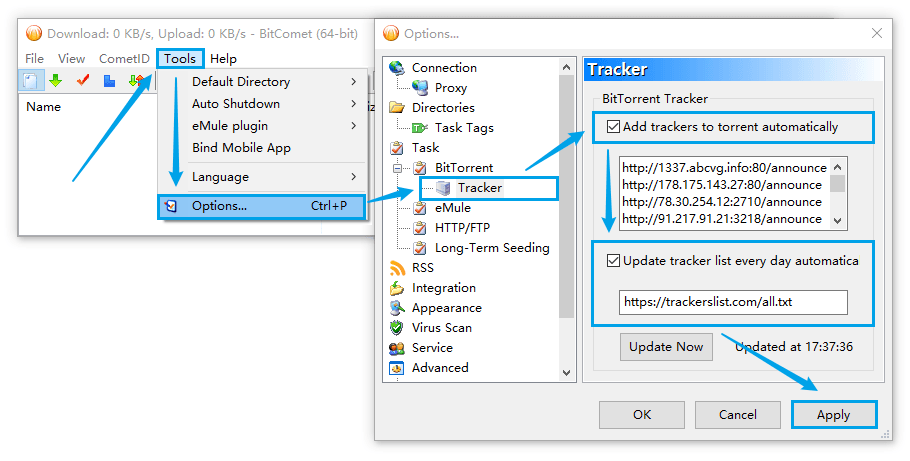
Download BitComet from the official website: www.bitcomet.com
qBittorrent Enhanced Edition
qBittorrent Enhanced Edition is a feature-rich version of qBittorrent with additional functionalities. To use our tracker list:
- Open qBittorrent Enhanced Edition.
- Go to Tools > Options (or press Ctrl+P).
- Select "BitTorrent" in the sidebar.
- In the "Automatically add these trackers to new downloads" section, paste the tracker URLs from our "Best Trackers" list.
- Click "Apply" and then "OK".
- Restart qBittorrent Enhanced Edition to apply the changes.
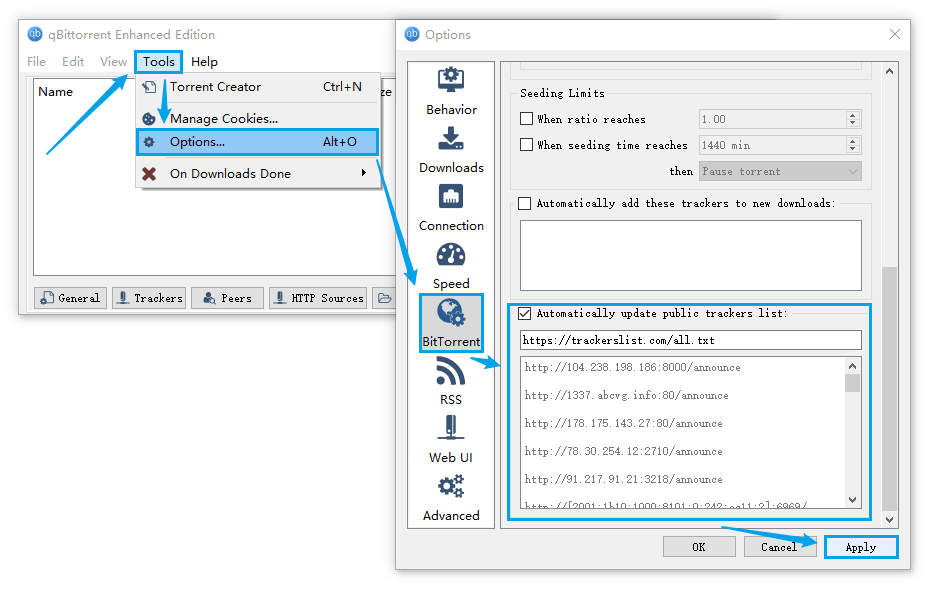
Download qBittorrent Enhanced Edition from GitHub: github.com/c0re100/qBittorrent-Enhanced-Edition
qBittorrent
qBittorrent is a free and open-source BitTorrent client. To add trackers in qBittorrent:
- Open qBittorrent and go to Tools > Options (or press Ctrl+P).
- Select "BitTorrent" in the sidebar.
- Scroll down to the "Automatically add these trackers to new downloads" section.
- Paste the tracker URLs from our "Best Trackers" list into the text box.
- Click "Apply" and then "OK".
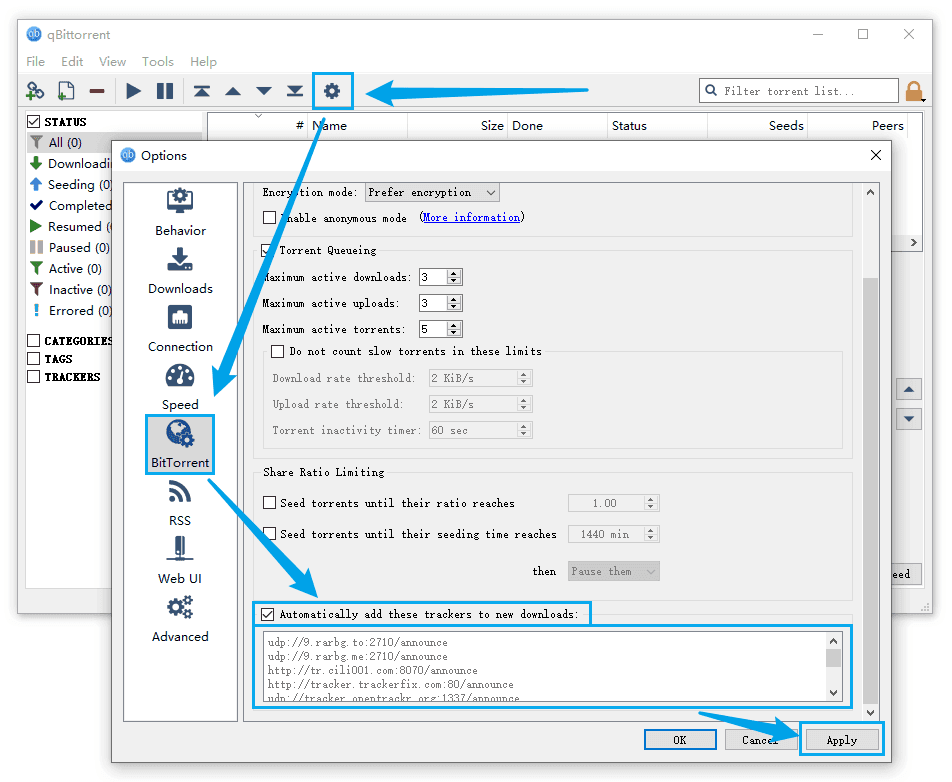
Download qBittorrent from the official website: www.qbittorrent.org
Motrix
Motrix is a full-featured download manager that supports multiple protocols. To add trackers in Motrix:
- Open Motrix and click on the gear icon to access Settings.
- Go to the "Advanced" tab.
- Scroll down to the "BitTorrent" section.
- In the "BT Tracker" field, paste the tracker URLs from our "Best Trackers" list.
- Click "Save" to apply the changes.
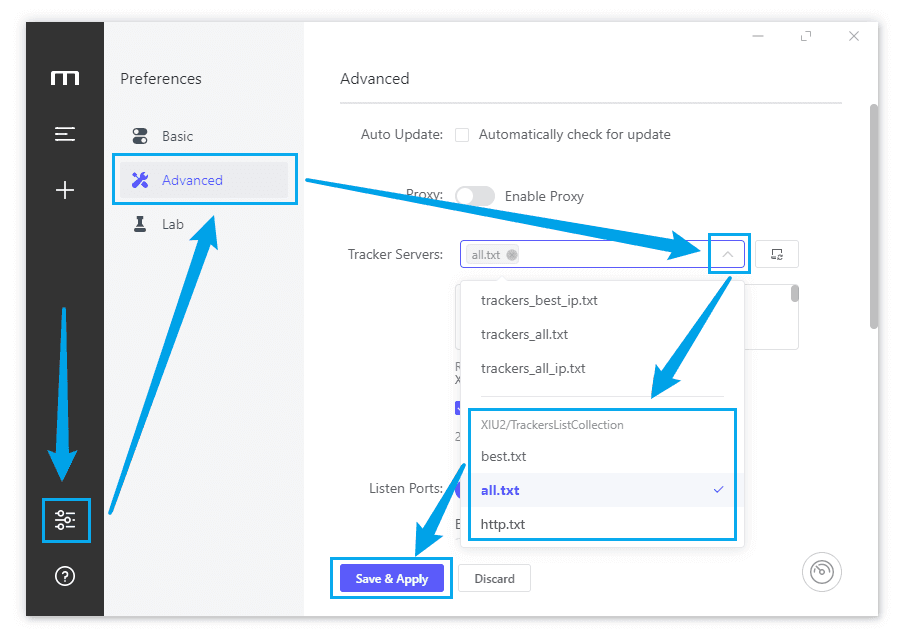
Download Motrix from the official website: motrix.app
General Usage Instructions
1. Understanding the Role of Trackers
BitTorrent Trackers are key components in P2P networks, coordinating communication between different users (called "peers"). Trackers maintain a list of all users currently downloading or seeding a specific file, enabling users to find each other and exchange data. Using high-quality Trackers can significantly improve your download speeds and seeding efficiency.
2. Adding Trackers to Your Torrent Client
Most BitTorrent clients allow you to add Trackers globally or for individual torrents. Typically, you can find a "Trackers" or "Tracker URLs" option in the torrent's properties or settings. Copy and paste the Tracker URLs we provide into this area. Some clients support bulk adding, allowing you to paste multiple URLs at once, with one URL per line.
3. Choosing the Right Tracker List
We offer various Tracker lists to meet different needs. The "Best Trackers" list contains the most reliable and responsive Trackers, suitable for most users. If you encounter connection issues, you can try UDP, HTTP, or HTTPS Trackers. For clients using specific protocols, we also provide WebSocket (WS) Trackers. IP Trackers are particularly useful when there are domain name resolution issues.
4. Regularly Updating Your Tracker List
The availability and performance of Trackers may change over time. It's recommended to update your Tracker list regularly (e.g., weekly or monthly) to ensure optimal performance. You can easily copy the latest Tracker list using the "Copy Trackers" button on our website, then update them in your client. Some advanced clients even support automatic updating of Tracker lists.
5. Optimizing Tracker Usage
While adding more Trackers generally increases the chances of finding peers, using too many Trackers can potentially decrease performance. It's recommended to start with the "Best Trackers" list and gradually add others if download speeds are not satisfactory. Additionally, some private Trackers may not allow the use of public Trackers, so be sure to follow relevant rules when using them. Finally, ensure your firewall or VPN settings are not blocking Tracker connections to get the best results.
Frequently Asked Questions
What are BitTorrent trackers?
BitTorrent trackers are servers that help in the communication between peers using the BitTorrent protocol. They keep track of which peers have which parts of the files being shared.
How do I use these tracker lists?
Copy the tracker URLs from the lists and add them to your torrent client's tracker list or to individual torrents. Most clients allow you to add multiple trackers at once.
How often are these lists updated?
The tracker lists are updated daily. Our website fetches the latest data every time you load the page, ensuring you always have the most up-to-date information.
What's the difference between the various tracker types?
UDP trackers are faster but less reliable, HTTP and HTTPS trackers are more reliable but slower, and WebSocket (WS) trackers are good for web-based clients. IP trackers use direct IP addresses instead of domain names.
Which tracker list should I choose?
For most users, the "Best Trackers" list is recommended as it contains the most reliable and fastest trackers. If you experience connection issues or need specific features, you can try other specialized lists like UDP, HTTP, or IP trackers.
Why do I get "Time Out" or "Torrent Aborted" messages?
These messages typically occur when trackers are temporarily unavailable or overloaded. This is normal and why we recommend using multiple trackers. The client will automatically try other trackers in your list.
Do you support IPv6 trackers?
Yes, we maintain separate lists for IPv6 trackers. These are particularly useful if you're on an IPv6 network or if your ISP provides IPv6 connectivity. They can often provide better performance on IPv6-enabled networks.
Are there special trackers for anonymous browsing?
Yes, we include I2P/Tor/Onion trackers in our lists. These trackers are specifically designed for anonymous browsing and can be used with appropriate proxy settings in your torrent client.
What should I do if I find duplicate trackers?
Our lists are automatically maintained to remove duplicates, but if you find any, please report them through our GitHub issues. We regularly clean and verify the lists to ensure optimal performance.
Can I suggest new trackers to be added?
Yes! You can submit new trackers through our GitHub repository. Please provide the tracker URL and any relevant information about its performance and reliability. We review all submissions to maintain list quality.
Is there an RSS feed available for tracker updates?
While we don't currently provide an RSS feed, we're working on implementing this feature. For now, you can check our GitHub repository or website for the latest updates to the tracker lists.
Why are some trackers removed from the lists?
Trackers may be removed if they become consistently unreliable, go offline for extended periods, or violate our listing policies. We regularly monitor tracker performance to maintain the quality of our lists.
Do you support HTTPS trackers?
Yes, we maintain a separate list for HTTPS trackers. These provide encrypted communications and are especially useful when privacy is a concern. However, they might be slightly slower than UDP trackers due to the encryption overhead.
How can I access the tracker lists if the website is down?
Our tracker lists are also available through our GitHub repository and IPFS mirrors. This ensures you can always access the latest tracker lists even if the main website is temporarily unavailable.